

Nondiscrimination Testing


Action Items: What to Do First

The Internal Revenue Code requires Section 125, Section 105(h), and Cafeteria plans—including FSAs, HRAs, HSAs, and pretax premium arrangements—to pass specific nondiscrimination testing each plan year. These tests are necessary to maintain the plans’ tax‑favored status and to help employees avoid income taxation on benefits.

Alerus’ robust nondiscrimination testing services provide an opportunity to project nondiscrimination testing outcomes and proactively correct any testing failures for the plan year before the final year-end testing occurs. Alerus currently offers nondiscrimination testing for existing FSA, HRA, or HSA clients only. If you are a current Alerus benefits client and would like Alerus to complete nondiscrimination testing for this plan year, please review the testing overview and submission steps outlined below.

If you are not currently an Alerus client and are interested in learning more about our benefits administration and testing services, please reach out to us at health_benefits_client_support@alerus.com. We would appreciate the opportunity to connect and explore how we can support your organization.

Testing Process

Alerus recommends that employers complete two tests for each plan year: a mid-year test conducted during the plan year and a final year-end test performed after the plan year ends. While regulations require only one year-end test per plan year, Alerus includes the option to run multiple mid-year tests as part of our testing services. These mid-year tests help employers anticipate year-end results and provide the opportunity to make prospective benefit changes during the plan year, if necessary, to ensure the plan passes testing.

Mid-Year Test

Mid-Year Testing Data Requirements

The mid-year testing data is required to include:

  1. All employees who worked during the plan year, including employees with no applicable benefit amounts.
  2. All applicable benefit amounts incurred from the beginning of the plan year through the current date, as well as estimated amounts expected to be incurred through the end of the plan year.
  • Benefit amounts consist of employee and employer contributions or employer‑provided benefits made available under the plans on a pre‑tax basis, including, but not limited to:
    • Pre-tax insurance premiums
      Pre‑tax insurance premiums may include employer‑sponsored group medical, dental, and other eligible benefit plans. Pre‑tax eligibility is governed by applicable tax regulations and the employer’s Section 125 Cafeteria Plan document and is administered in accordance with the terms of the applicable plan carrier.
    • HSA contributions made on a pre‑tax basis
    • FSA annual elections
    • HRA annual benefit amounts made available to participants

Mid-year Testing Pass

If the plan is currently passing with no evidence of failure during the plan year, additional mid-year testing is not necessary, provided no benefit changes occur from the mid-year testing date through year-end.

After the initial mid-year testing passes, employers must monitor any benefit changes that occur during the plan year. If changes occur and additional testing is desired, employers may complete another mid-year test through the Alerus testing website prior to the end of the plan year. Benefit changes include, but are not limited to:

  • Increase or decrease in employment or benefit participation
  • Merger or acquisition
  • Changes to benefit plans

Mid-year Testing Failure

If plan testing is failing or close to failing, plan modifications and retesting may be necessary before plan year end. Employers should make the recommended changes identified in the testing results as soon as possible and may complete another mid-year test through the Alerus testing website to confirm the plan passes.

Year-End Test

Year-End Testing Data Requirements

The year-end testing data is required to include:

  1. All employees who worked during the plan year, including employees with no applicable benefit amounts.
  2. All applicable benefit amounts incurred from the beginning of the plan year through the end of the plan year.

Benefit amounts consist of employee and employer contributions or employer‑provided benefits made available under the plans on a pre‑tax basis, including, but not limited to:

  • Pre-tax insurance premiums
    Pre‑tax insurance premiums may include employer‑sponsored group medical, dental, and other eligible benefit plans. Pre‑tax eligibility is governed by applicable tax regulations and the employer’s Section 125 Cafeteria Plan document and is administered in accordance with the terms of the applicable plan carrier.
  • HSA contributions made on a pre‑tax basis
  • FSA annual elections
  • HRA annual benefit amounts made available to participants

The year-end testing results constitute the final nondiscrimination testing results for the plan year. Benefit adjustments are not permitted after the close of the plan year.

Registration

To begin nondiscrimination testing, employers must first request access to the Alerus nondiscrimination testing website.

How to Request Access

  • Complete and submit the Alerus Nondiscrimination Testing Access Form.
  • The form is available in your Alerus FSA/HRA/HSA employer website under:
    Tools → Resources → “Nondiscrimination Testing Access Form”
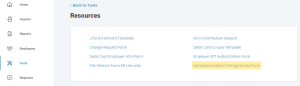
Registration Resources Screen


  • Once completed, submit the form in your employer website under Requests → New Request:
    • Select “Other” as the request type (Step #1)
    • Upload the completed form and select Submit Request (Step #2)
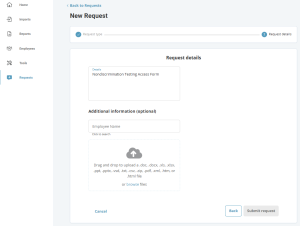
Registration Request Screen

What Happens Next

  • After the form is processed, you will receive an email within 1–2 weeks
  • The email will come from noreply@serviceaccount.com
  • The email will include instructions on how to register and log in to the nondiscrimination testing website
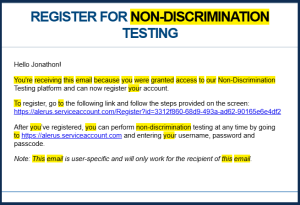
Registration Confirmation

Testing Templates

Download the correct testing template based on the benefit plans offered during the plan year.

POP

  • Pre‑tax premiums only
  • HSA only
  • HSA and pre‑tax premiums

POPFSA

  • FSA only
  • FSA and HSA
  • FSA and pre‑tax premiums
  • FSA, HSA, and pre‑tax premiums

HRA

  • HRA only
    (no FSA, pre‑tax premiums, or HSA)

POPFSA & HRA

  • FSA and HRA
  • FSA, HRA, and pre‑tax premiums
  • FSA, HRA, HSA, and pre‑tax premiums
  • HRA and HSA
  • HRA, HSA, and pre‑tax premiums
  • HRA and pre‑tax premiums

Uploading Your Testing Data

Complete the appropriate testing template and upload it through the nondiscrimination testing website.

Complete the Testing Template

Complete the data testing template. The template includes three worksheets:

  • Definitions
    Provides helpful definitions of terms used in the data worksheet and explains what is required in each column of data.
  • Data
    Where the testing data is entered.
    Include all employees who worked during the plan year, even if they had no applicable benefit elections.
  • Subjective Questions
    Additional required testing questions.

Upload the Completed Template

Once the testing template is complete, upload it to the nondiscrimination testing website and select the appropriate template type, business entity type, and testing method.
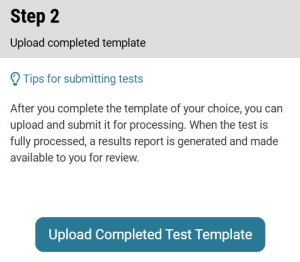
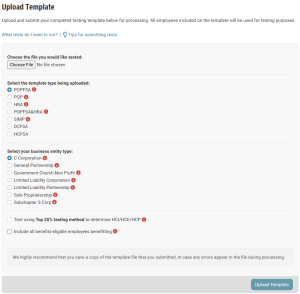
Step 2 Upload Template

Reviewing Your Test Results

Once your testing data template has been uploaded, you can review your nondiscrimination testing results by selecting View Test Results & History in the testing website.

Status and Results
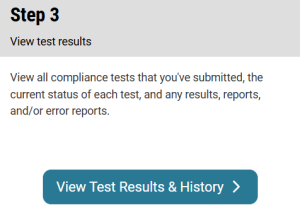
Review Results

Status: Indicates whether a testing data import has been completed or is still in process.

  • If the testing import is still in process, refresh the page to check for an updated status.

Results: Indicates a summary of the import success and whether the nondiscrimination test passed or failed.

  • Passed
    Indicates the test was processed successfully and the nondiscrimination test passed.
  • Test Failed
    Indicates the test was processed successfully and the nondiscrimination test failed.
  • Import Failed
    Indicates the template was incorrectly formatted and testing was not completed.
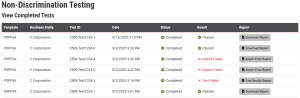
Status

Report Summary

Displays the testing or import results available for download.

  • Passed
    Select Download Report to download the nondiscrimination testing results for your records.
  • Test Failed
    Select Test Results Report to download the nondiscrimination testing results.
  • Import Failed
    Select Import Error Report to view specific import errors to correct and re-upload the testing data template.
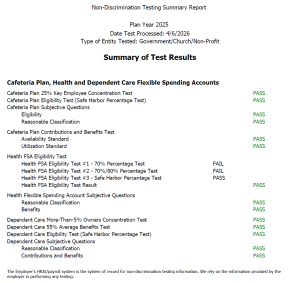
Final Report